

5 IT Monitoring Metrics Every Business Should Track for Better Performance

Technology issues rarely happen without warning. Slow computers, failing hard drives, overloaded servers, and suspicious network activity often show signs long before they lead to downtime. The challenge is that most businesses don't have the tools or time to recognize those warning signs before they become costly problems.
That's where IT monitoring makes a difference. Rather than waiting for employees to report issues, proactive monitoring continuously tracks the health, performance, and security of your IT environment. It allows businesses to identify developing problems, respond faster, and reduce disruptions before productivity is affected.
If your organization wants to improve reliability and reduce unexpected technology costs, here are five IT monitoring metrics every business should be tracking.
What Is IT Monitoring?
IT monitoring is the ongoing process of observing the performance, availability, and security of your technology systems. This includes servers, workstations, networks, cloud services, applications, and connected devices.
Instead of relying on reactive support after something breaks, IT monitoring uses automated tools to detect performance issues, hardware failures, security concerns, and other anomalies in real time. When something falls outside of normal operating conditions, alerts can be generated so IT professionals can investigate and resolve the issue before it impacts users.
For growing businesses, proactive IT monitoring is one of the most effective ways to improve uptime, strengthen cybersecurity, and extend the life of technology investments.
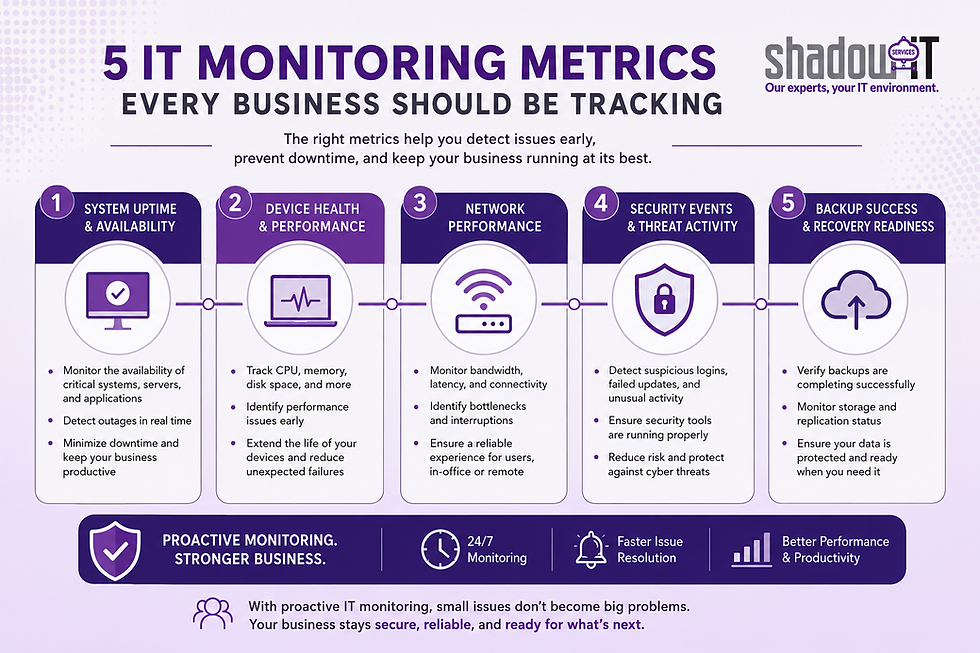
1. System Uptime and Availability
One of the most important metrics to monitor is whether critical systems remain available when employees need them.
Downtime affects nearly every aspect of a business. Employees may lose access to files, customers may be unable to reach your services, and important workflows can come to a halt. Even short outages can result in lost productivity and frustrated customers.
IT monitoring tracks the availability of key systems such as:
File servers
Cloud applications
Email systems
Line-of-business software
Network infrastructure
Continuous monitoring ensures that outages are detected immediately instead of waiting until employees begin submitting support requests. Faster detection often means faster recovery and less disruption to daily operations.
2. Device Health and Performance
Computers and servers rarely fail without warning. Components often show signs of deterioration through declining performance or increasing resource usage.
Monitoring device health allows businesses to identify issues such as:
High CPU utilization
Memory shortages
Low disk space
Hard drive errors
Hardware overheating
For example, a server consistently operating at 95 percent CPU usage may continue functioning for weeks before performance suddenly degrades. Identifying that trend early allows upgrades or adjustments before employees experience slowdowns.
Monitoring workstation performance can also reveal aging hardware that is reducing employee productivity long before complete failure occurs.
3. Network Performance
Your network connects everything in your business, from internet access and cloud applications to printers and communication systems. Poor network performance often leads to slow applications, dropped connections, and frustrated employees.
Effective IT monitoring keeps an eye on metrics, including:
Bandwidth usage
Network latency
Packet loss
Internet connectivity
Wireless performance
These metrics help identify congestion, failing networking equipment, or internet service issues before they affect day-to-day operations.
As more businesses rely on cloud applications like Microsoft 365 and remote work environments, maintaining network performance has become even more important. Small connectivity issues that once went unnoticed can now significantly impact productivity across the organization.
4. Security Events and Threat Activity
Modern cybersecurity isn't just about blocking attacks—it's about detecting suspicious activity as early as possible.
IT monitoring plays an essential role in identifying security concerns before they become major incidents.
Examples of monitored security events include:
Multiple failed login attempts
Disabled antivirus software
Unusual user activity
Unauthorized device connections
Failed software updates
Firewall alerts
Endpoint protection notifications
Monitoring these events provides valuable visibility into potential cyber threats. Rather than discovering a security problem after data has already been compromised, businesses can investigate suspicious activity immediately and reduce the risk of more serious damage.
Continuous monitoring also helps ensure that security tools remain operational and that critical protections haven't been accidentally disabled.
5. Backup Success and Recovery Readiness
Having backups is important, but simply creating backups isn't enough. Businesses also need to know whether backups are actually completing successfully.
Failed backups often go unnoticed until disaster strikes and recovery is needed.
IT monitoring verifies important backup metrics such as:
Backup completion status
Storage capacity
Replication success
Backup scheduling
Recovery errors
By continuously monitoring backup health, businesses gain confidence that critical data can be restored when needed.
This visibility is especially important as ransomware attacks continue to target organizations of all sizes. Reliable backups remain one of the strongest defenses against prolonged downtime and data loss.
Why Manual IT Checks Aren't Enough
Many small and mid-sized businesses still rely on occasional manual inspections or wait for employees to report problems.
Unfortunately, this reactive approach creates several challenges.
Technology issues can develop overnight, during weekends, or while employees are away from the office. By the time someone notices a problem, productivity has already been affected.
Manual checks also become increasingly difficult as businesses add more computers, cloud services, mobile devices, and remote employees.
Automated IT monitoring provides continuous visibility around the clock, allowing issues to be detected and addressed much earlier than manual processes ever could.
How Proactive IT Monitoring Supports Business Growth
The goal of IT monitoring isn't simply to collect data. It's to help businesses operate more efficiently with fewer unexpected interruptions.
Organizations that invest in proactive monitoring often experience benefits such as:
Reduced downtime
Faster issue resolution
Longer hardware lifespan
Improved employee productivity
Better cybersecurity visibility
More predictable technology budgeting
Instead of constantly reacting to emergencies, business leaders gain confidence that their technology environment is continuously monitored by experienced professionals.
This proactive approach allows internal teams to stay focused on serving customers and growing the business rather than troubleshooting avoidable IT issues.
Keep Your Business Running with Proactive IT Monitoring
Technology is one of your organization's most valuable assets, but only when it's operating reliably and securely. Waiting for systems to fail before taking action can lead to unnecessary downtime, higher repair costs, and increased cybersecurity risks.
Proactive IT monitoring helps identify performance issues, security concerns, and hardware problems before they disrupt your business. By continuously tracking the health of your IT environment, you gain greater visibility, faster response times, and fewer surprises.
At Shadow IT Services, we provide comprehensive IT monitoring designed to keep your systems running smoothly around the clock. From network performance and endpoint health to security monitoring and backup verification, our team works behind the scenes to detect issues early so your business can stay productive, secure, and focused on what matters most.
If you're ready to move from reactive IT support to proactive technology management, contact Shadow IT Services to learn how our IT monitoring solutions can help protect your business.


Comments